 Bloomz
Lock or unlock who can create classes at your school
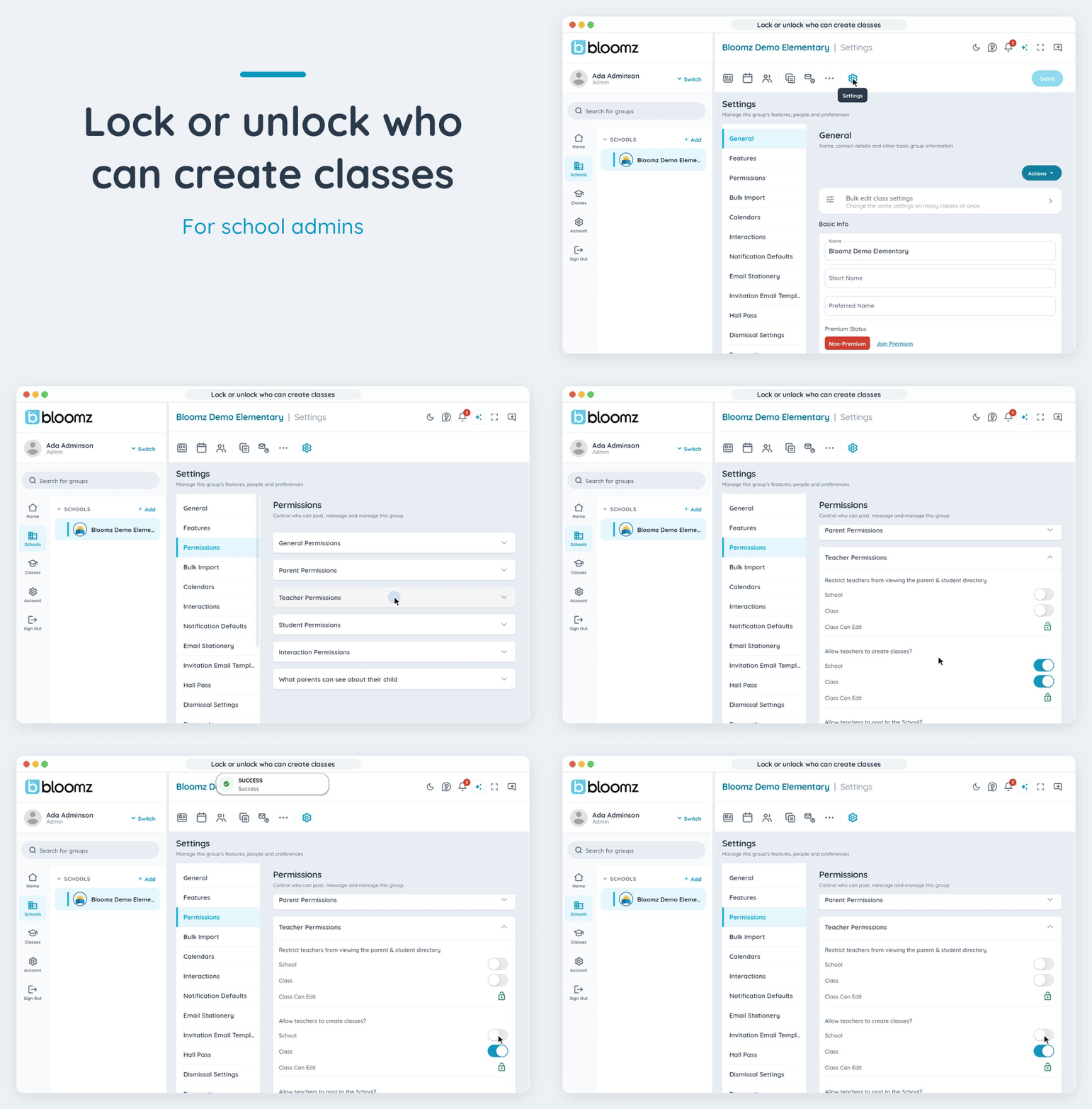
Decide whether teachers at your school can create their own classes, or only school admins can. The setting is controlled at the school level, and a lock decides whether individual classes may override it. There is no per-teacher exception list for class creation.
Before you start
You need school-admin access. Turning the School switch off applies to every teacher at your school at once; there's no way to unlock class creation for one teacher while leaving it locked for the rest.
Step 1 — Open Permissions
Open your school, select the gear-icon Settings tab, then Permissions. You'll see sections for General Permissions, Parent Permissions, Teacher Permissions, Student Permissions and more.
Step 2 — Find the class-creation setting
Open Teacher Permissions and find Allow teachers to create classes?. It has a School switch, a Class switch and a Class Can Edit lock.
Step 3 — Turn it on or off
Flip the School switch on to let teachers create their own classes, or off to require an admin to create classes for them. The change saves as you flip it and a green Success message appears; there is no Save button on this screen.
Watch out: because this is school-wide, unlocking it so one trusted teacher — a department head, say — can create classes also unlocks it for every other teacher. If you want tighter control while still letting one person set up sections, keep it locked and create those classes for them yourself instead.